Staying Connected Has Never Been Simple
The Messages section of BNK Connect acts as your business Inbox. You can instantly message a client by clicking on ‘Compose’ and entering your message.

To create your custom message, simply fil in the subject line and your message.
This messaging centre is a great way to build relationships by sending out promotional offers, sharing tips for hitting goals or even just wishing them well for an upcoming event.
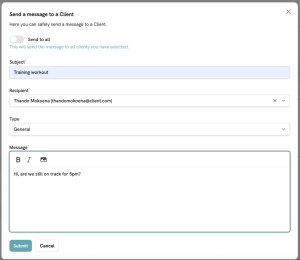
To ensure you and your clients can track the messages, you can also select a category for them from a drop-down list.
For example, using the Follow up or Inquiry categories is a great way to ensure clients see your promotional material, which can increase your bottom line.

Finally, you don’t need to type the same message multiple times. You can create the message, select the category and then switch the selector to ‘Send to all’, which lets you choose multiple clients before hitting send!